Neighbors can visit LauderBuild to check the processing status details to monitor progress and see any comments or corrections requests on an record at any time. The steps will be a little different for permit records depending on whether the application is undergoing the digital or paper plan review process.
View Processing Status and Comments in the LauderBuild Plan Room (LPR)
In order to be able to access the LauderBuild Plan Room (LPR) you must have a LauderBuild account AND your LauderBuild account contact MUST be a contact on the permit record. Please contact the Permitting team if you need access to a record and you cannot see the LPR.
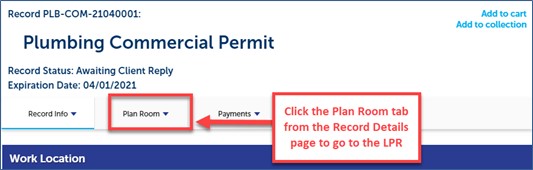
Log in to your LauderBuild account, search for the record number in the Global Search (please ensure you enter the entire correct number, including any letters and dashes) and click the Plan Room tab.
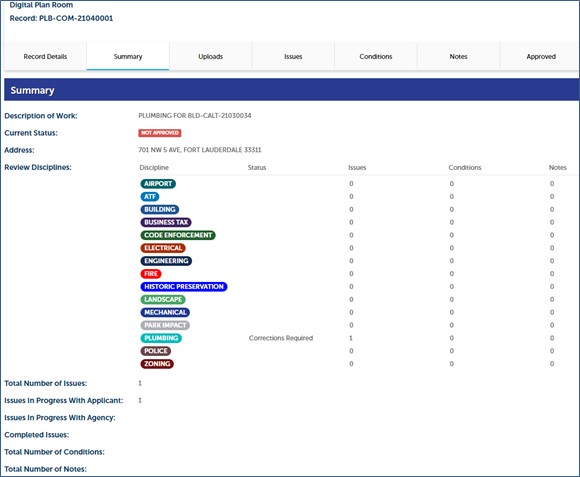
On the LPR Summary page you can see at-a-glance, if there are Issues, Conditions or Notes and then you can click on the respective tabs for more details. Please view the Reviewing Issues, Conditions and Notes tutorial for more details.
View Record Processing Status and Comments – Paper Processing
Search for the record number in the Global Search; please ensure you enter the entire correct number, including any letters and dashes. If you do not have a record number you may use the Module Search to search by address.
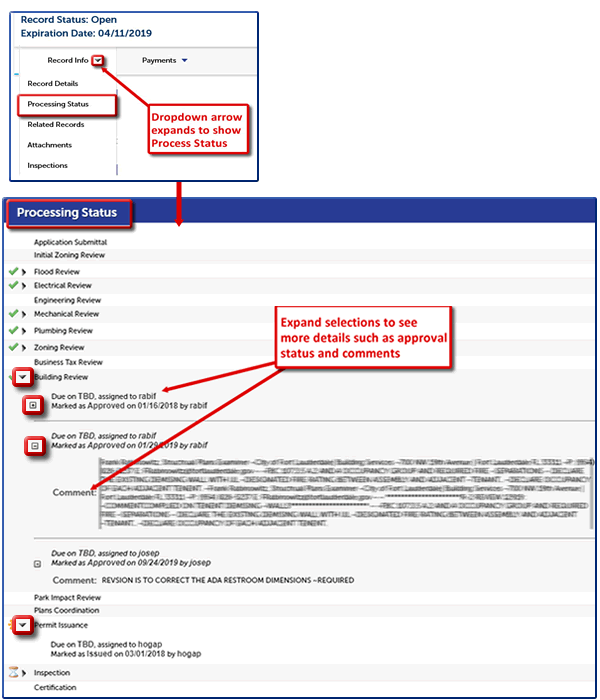
Then click the dropdown arrow next to Record Info and select Processing Status. The Processing Status page displays the full business processes of the record. The icons show the process status and you can expand the arrows and plus signs to see more details. Every place there’s an arrow or + sign, it expands with more info, such as comments. We recommend expanding all of the items to ensure you have all the details.
Please note that the steps in the business process will differ based on record type and that green Checkmarks only mean that the task is Completed. IT DOES NOT DESIGNATE WHETHER THAT TASK HAS BEEN ACCEPTED, APPROVED, PASSED, ETC. Always expand the details for more information.
LauderBuild FAQ - How-To: View Record Details
*Click to view/download.
